
If you own a Toyota, you’ve likely seen the maintenance light on your dashboard. This is just a reminder, not a warning. It helps you remember routine service, like an oil change or inspection, usually every 5,000 miles.
If the light stays on after an oil change, it’s because you need to reset it manually. The process is quick, easy, and needs no tools. This guide gives you step-by-step instructions for resetting the maintenance light on most Toyotas, with or without push-button start.
What the Toyota Maintenance Light Means
The maintenance light is a mileage-based reminder. It signals oil changes, tire rotations, or checkups, usually every 5,000 miles.
Many confuse the maintenance light with the check engine light. The check engine light means a problem; the maintenance light just tracks mileage for routine service.
If the maintenance light flashes, then stays solid, you’re due or overdue for service. Following these reminders helps your Toyota last longer.
When Should You Reset the Maintenance Light on Your Toyota?
Reset the maintenance light only after performing the required service. Toyota designed it to help you track oil changes, fluid checks, tire rotations, and inspections. If you reset without doing the maintenance, you could lose track of service intervals.
Most shops reset the light after an oil change, but if you do your own maintenance or a shop forgets, you’ll need to handle it. Resetting starts a new 5,000-mile countdown, ensuring the next reminder is accurate.
Don’t reset the light just to remove it. Skipping maintenance can lead to engine wear and reduced performance over time.
How to Reset the Maintenance Light on Most Toyota Models: Step-by-Step
This reset method works for most Toyota vehicles with a traditional key ignition, like older Camry, Corolla, Tacoma, Tundra, RAV4, and Highlander models. It’s quick, easy, tool-free, and gets your maintenance light back to zero in no time.
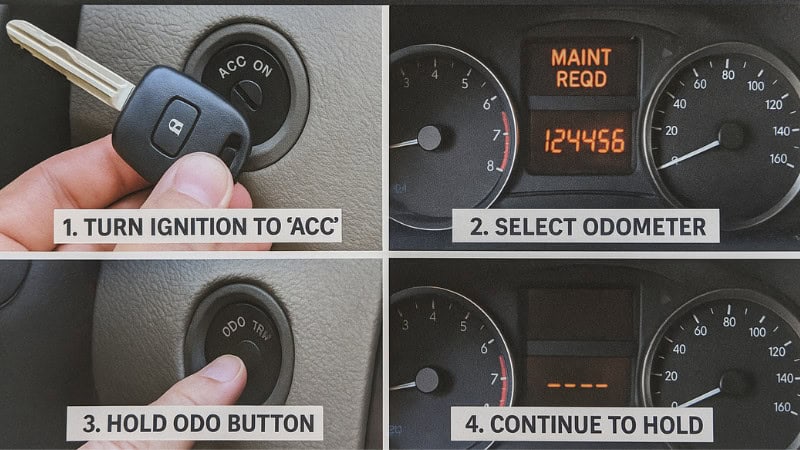
Step-by-Step Instructions
- Turn the key to the “ON” position (engine off).
Don’t start the engine—just power the dashboard. - Press the ODO/TRIP button until the display shows “ODO.”
Some Toyota models require “TRIP A,” but “ODO” works for most. - Turn the ignition OFF.
- Press and hold the ODO/TRIP button.
- While holding the button, turn the key back to the “ON” position.
Keep holding the button the entire time. - You’ll see the maintenance light begin to flash and a countdown of dashes appear (– – – – → 0).
This means the reset process is working. - Once the display shows “000000,” release the button.
The maintenance light should now be fully reset.
That’s it! You’ve just reset the 5,000-mile maintenance reminder on your Toyota.
How to Reset the Maintenance Light on Toyota Push-Button Start Models
With a Toyota push-button start, just turn on the dashboard without starting the engine to reset the light.
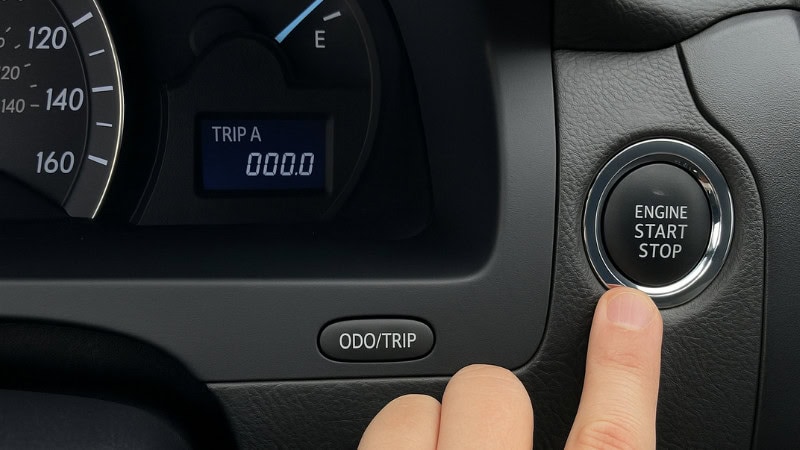
Step-by-Step Instructions
- Keep your foot OFF the brake pedal.
This prevents the engine from starting. - Press the START button twice to enter “ON” mode.
Your dashboard will light up, but the engine will remain off. - Use the ODO/TRIP button to switch the display to “ODO” or “TRIP A.”
Different Toyota models require different modes, but TRIP A is the most common on push-button vehicles. - Turn the ignition OFF by pressing the START button again.
- Press and hold the ODO/TRIP button.
- While holding it, press the START button twice again (foot still off the brake).
The maintenance light will start flashing. - Continue holding until the display resets to “000000.”
Then release the button.
This method works for most newer Toyotas, including Camry, Corolla, RAV4, Highlander, Tacoma, and Prius. It’s quick and easy.
Model-Specific Reset Guides
Different Toyota models follow slightly different reset procedures, especially when it comes to the display mode (ODO vs. TRIP A) or using the Multi-Information Display (MID). Here are quick breakdowns for the most common vehicles:
Toyota Camry (2012–2024)
Most Camry models require the display to be set to TRIP A before starting the reset.
Steps:
- Turn ignition to ON (engine off)
- Set display to TRIP A
- Turn ignition OFF
- Hold the TRIP button
- Turn the ignition ON while holding
- Wait for the countdown → release
Works on most non-hybrid and hybrid Camry models.
Toyota Corolla (2009–2024)
Corolla models commonly use ODO mode, but newer ones may use TRIP A.
Steps:
- Turn the ignition to ON
- Set to ODO or TRIP A
- Turn ignition OFF
- Hold button
- Turn ignition ON
- Resets flashes and clears
Toyota RAV4 (2013–2024)
Modern RAV4 models use the Multi-Information Display (MID).
Steps:
- Turn ignition ON
- Use the steering wheel button
- Go to Settings
- Open Vehicle Settings
- Select Maintenance Reset
- Confirm reset
Toyota Tacoma / Tundra
Most trucks still use the classic button method.
Steps:
- Key ON → set ODO
- Key OFF
- Hold ODO button
- Key ON while holding
- Reset to 000000
Toyota Highlander (2014–2024)
Newer Highlanders also use the MID.
Steps:
- Ignition ON
- Use steering controls
- Go to Settings
- Select Maintenance Reset
- Confirm
How to Reset the Maintenance Light Using the Multi-Information Display (MID)
Newer Toyotas from 2018 onward have a Multi-Information Display (MID) between the speedometer and tachometer. This lets you reset the maintenance reminder easily via on-screen menus rather than physical buttons.
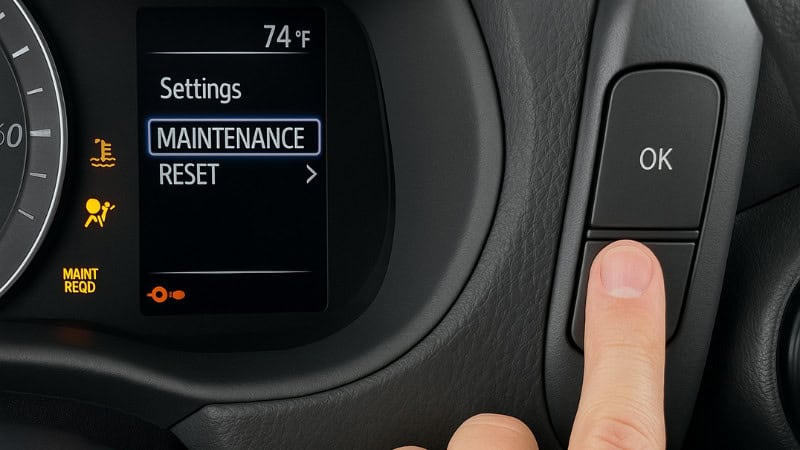
How To Reset Using the MID:
- Turn the ignition to ON (engine off).
Push-button models: press START twice with your foot off the brake. - Use the steering-wheel arrow buttons to scroll to the gear-shaped “Settings” menu.
- Navigate to “Vehicle Settings.”
Depending on the model, this may be under “Maintenance System.” - Select “Maintenance Reset” or “Oil Maintenance.”
- Choose “Yes” or “Reset” to confirm.
- The system will flash a confirmation message.
This method is standard on new models such as the RAV4, Highlander, Corolla, Camry, Prius, and Avalon. It’s quick and accurate.
What If the Maintenance Light Won’t Reset?
If the maintenance light won’t reset, you may have missed a step. Some Toyotas need ‘ODO,’ others ‘TRIP A.’
Another frequent cause is turning the ignition on incorrectly, especially on push-button vehicles. If your foot touches the brake, the engine will start, and the reset sequence won’t work. Make sure the dashboard is on without the engine running.
A weak or recently disconnected battery can also interrupt the reset process. If the vehicle lost power recently, you may need to repeat the reset steps twice.
In rare cases, the maintenance system may glitch. Turning the ignition off, waiting 10 seconds, and trying again often fixes it.
If the light still refuses to clear, the vehicle may have a different reset sequence—newer Toyota models with digital dashes sometimes hide the reset option inside the MID under Vehicle Settings → Maintenance Reset.
Should You Reset the Light If You Didn’t Change the Oil?
It’s never a good idea to reset the maintenance light without actually doing the service. This light is Toyota’s way of helping you stay on top of important upkeep, like oil changes and inspections. If you reset it before the work is done, you could end up driving thousands of miles past when your car really needs attention—and that’s a recipe for trouble.
Skipping or delaying maintenance can cause premature engine wear, reduced fuel efficiency, and sludge buildup. Many Toyota engines are extremely reliable, but only when maintained on schedule. If the light comes on and you’re not ready for service yet, it’s better to wait until the work is done before resetting it. The maintenance reminder works best when it reflects real service intervals.
How Often Does Toyota Require Maintenance
Toyota vehicles are known for long-term reliability, and one of the main reasons is their consistent maintenance schedule. Most Toyota models require routine service every 5,000 miles, which includes an oil change, tire rotation, fluid checks, and a general inspection. This is why the maintenance light is programmed to turn on at 4,500 miles (blinking) and stay solid at 5,000 miles.
Larger services occur at 15k, 30k, 60k, and 90k miles, during which items such as air filters, brake fluid, transmission fluid, and spark plugs may be inspected or replaced. Staying on this schedule keeps the engine clean, reduces wear, and ensures smoother performance. Following Toyota’s recommended intervals is the easiest way to protect your vehicle and avoid expensive repairs later.
Toyota Maintenance Light: Frequently Asked Questions (FAQs)
1. Does resetting the maintenance light harm the car?
Resetting the maintenance light does not harm your Toyota. It simply restarts the mileage-based reminder system that tracks your next service due date. There are no sensors connected to this light, and it doesn’t affect engine operation, fuel trims, or performance. The only risk is resetting it without actually performing the maintenance, which can cause you to lose track of your service schedule. As long as you change the oil and complete the required checks beforehand, resetting the light is completely safe and part of routine ownership.
2. Why does the maintenance light come back so quickly?
If the maintenance light returns shortly after you reset it, the display mode may have been incorrect during the reset. Many Toyotas require TRIP A instead of ODO, so using the wrong mode prevents the reset from saving. Another reason is incomplete maintenance—if the shop forgot to reset the light or the battery was disconnected, the reminder may reappear. Push-button models are also tricky because pressing the brake accidentally starts the engine, interrupting the sequence. When done correctly, the reset should last the full 5,000-mile interval.
3. Do Toyota hybrids have a different reset process?
Most Toyota hybrids, including the Prius, Camry Hybrid, RAV4 Hybrid, and Highlander Hybrid, use the same button sequence as their non-hybrid counterparts. The only difference is that many hybrids rely on the Multi-Information Display (MID) for resets instead of the ODO button. In these models, you typically navigate to Settings → Vehicle Settings → Maintenance Reset, then confirm. The hybrid system doesn’t affect how maintenance reminders work—the vehicle still tracks service intervals by mileage. As long as you follow the menu or ODO/TRIP process, the reset is straightforward.
4. Will disconnecting the battery reset the maintenance light?
Disconnecting the battery may temporarily clear certain dash lights, but the maintenance light often remains or comes back on when the vehicle accumulates more mileage. Toyota programs the maintenance reminder into the cluster’s internal memory, not just the ECU, so a battery reset isn’t a reliable method. In some cases, the light may briefly disappear but reappear after driving a few miles. The proper way to clear it is to use the specific reset sequence for your Toyota model—either via the ODO/TRIP method or the MID settings on newer vehicles.
5. Can I drive with the maintenance light on?
Yes, you can keep driving with the maintenance light on; it’s not a failure or a safety warning. It simply means your vehicle has reached the recommended maintenance interval. However, ignoring it for too long can lead to overdue oil changes, dirty filters, or missed inspections—issues that eventually impact engine life and fuel efficiency. Think of the maintenance light as a reminder, not an emergency. The sooner you complete the service and reset it, the better your Toyota will perform, and the longer your engine will last.
6. Why does the maintenance light flash before staying solid?
Toyota designed the maintenance reminder to flash before it becomes solid as an early warning. Usually, the light starts flashing for about 3–5 seconds at startup once you’re close to the service interval. This lets you know maintenance is due soon. After passing the mileage threshold—typically 5,000 miles—the light stays on solid until you complete the service and reset it. This two-stage process helps you plan maintenance in advance and prevents missing important intervals. It’s a built-in system to keep your Toyota running reliably and efficiently.
Final Thoughts
Resetting the maintenance light on your Toyota is as easy as it gets—and it’s a great way to stay on track with regular service. Whether you have a classic key, a push-button start, or the latest Multi-Information Display, you can reset the reminder in just a few steps with no tools needed. Just be sure you’ve finished your oil change or maintenance before you reset. Toyota’s 5,000-mile intervals are there to keep your engine healthy, your fuel economy strong, and your vehicle running for years to come. Once the lights are off and your maintenance is done, you’re good to go for another 5,000 miles!
